
Procurement & Inventory
Procurement & Inventory
Nomni Supply new HQ Control + Bulk Inventory Imports
Nomni Supply new HQ Control + Bulk Inventory Imports
Nomni Supply new HQ Control + Bulk Inventory Imports
Nomni Supply's latest release makes multi-venue management easy: set one HQ to keep prices, recipes, and stock in sync, record productions and adjustments in bulk (web + mobile), and use supplier branch profiles for correct POs and invoices. One playbook; faster rollouts; easier training.
Nomni Supply's latest release makes multi-venue management easy: set one HQ to keep prices, recipes, and stock in sync, record productions and adjustments in bulk (web + mobile), and use supplier branch profiles for correct POs and invoices. One playbook; faster rollouts; easier training.
Written by

Nomni
The ultimate hospo solution
Multi-venue operators told us two things: “give HQ the wheel” and “let us update stock in one shot.” Done. Nomni Supply now gives head offices true central control across outlets, plus Excel imports for instant, venue-wide inventory adjustments and productions.
Read on for more detailed information.
The new HQ module
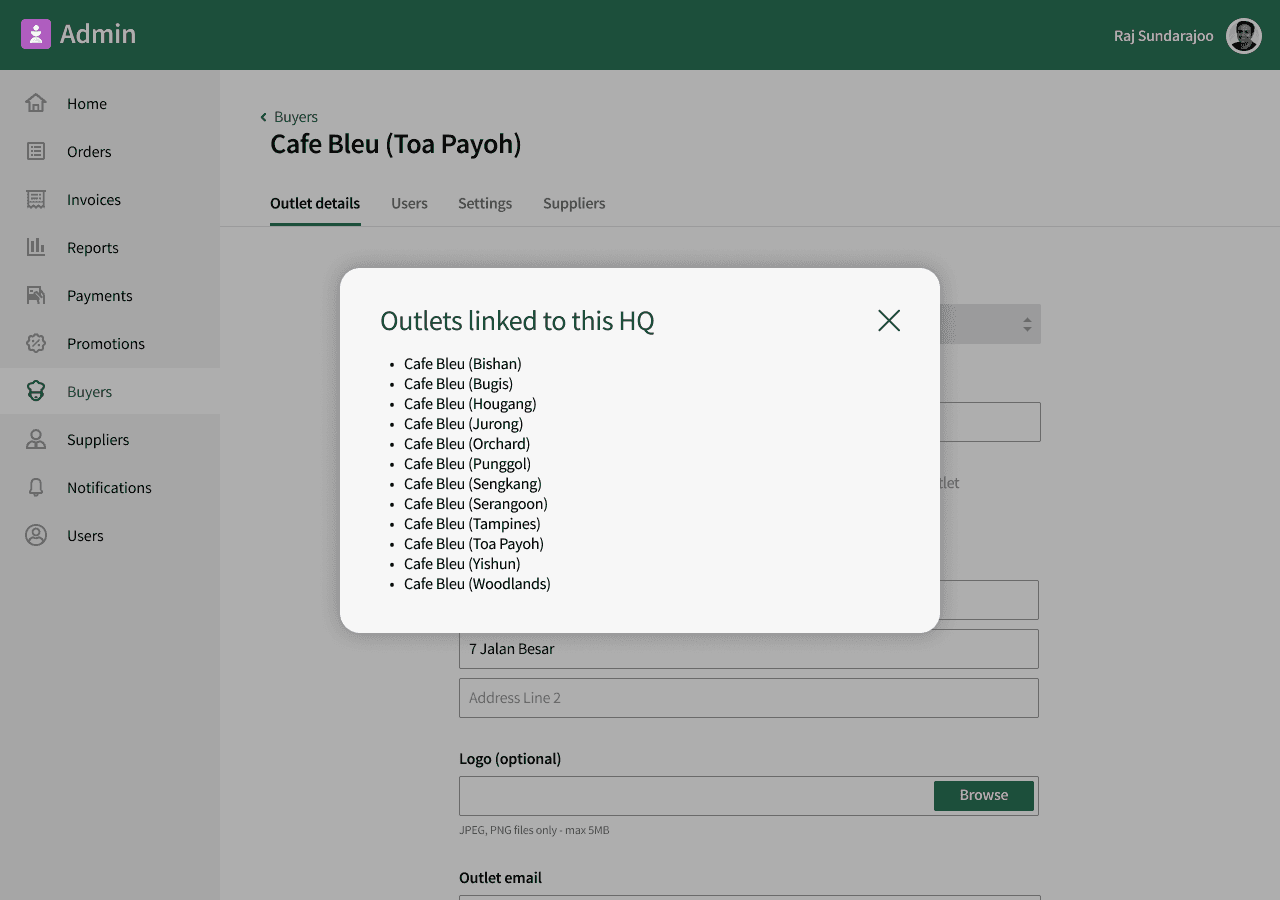
Nomni Supply now allows you to set any of your outlets (other than a central kitchen) as your HQ (headquarters). This HQ owns the master market lists, recipes, and inventory.
Choose one outlet as HQ. The HQ updates the product list, prices, and recipes once and every other outlet follows that data. Outlets can view, but not edit.
Why it helps:
One update, all stores: Add a new item or change a price at HQ and it shows up everywhere, no more copying between outlets
Fewer mistakes: Stores can’t accidentally change prices or recipes, so you don’t get different versions floating around
Stable food costs: The same inputs mean the same dish cost across locations, so margins are easier to compare
Faster rollouts: New menu item? Change it once at HQ and move on
Easier training: Teams across outlets follow one playbook, one version of truth and one process
Bulk updates for production & adjustments
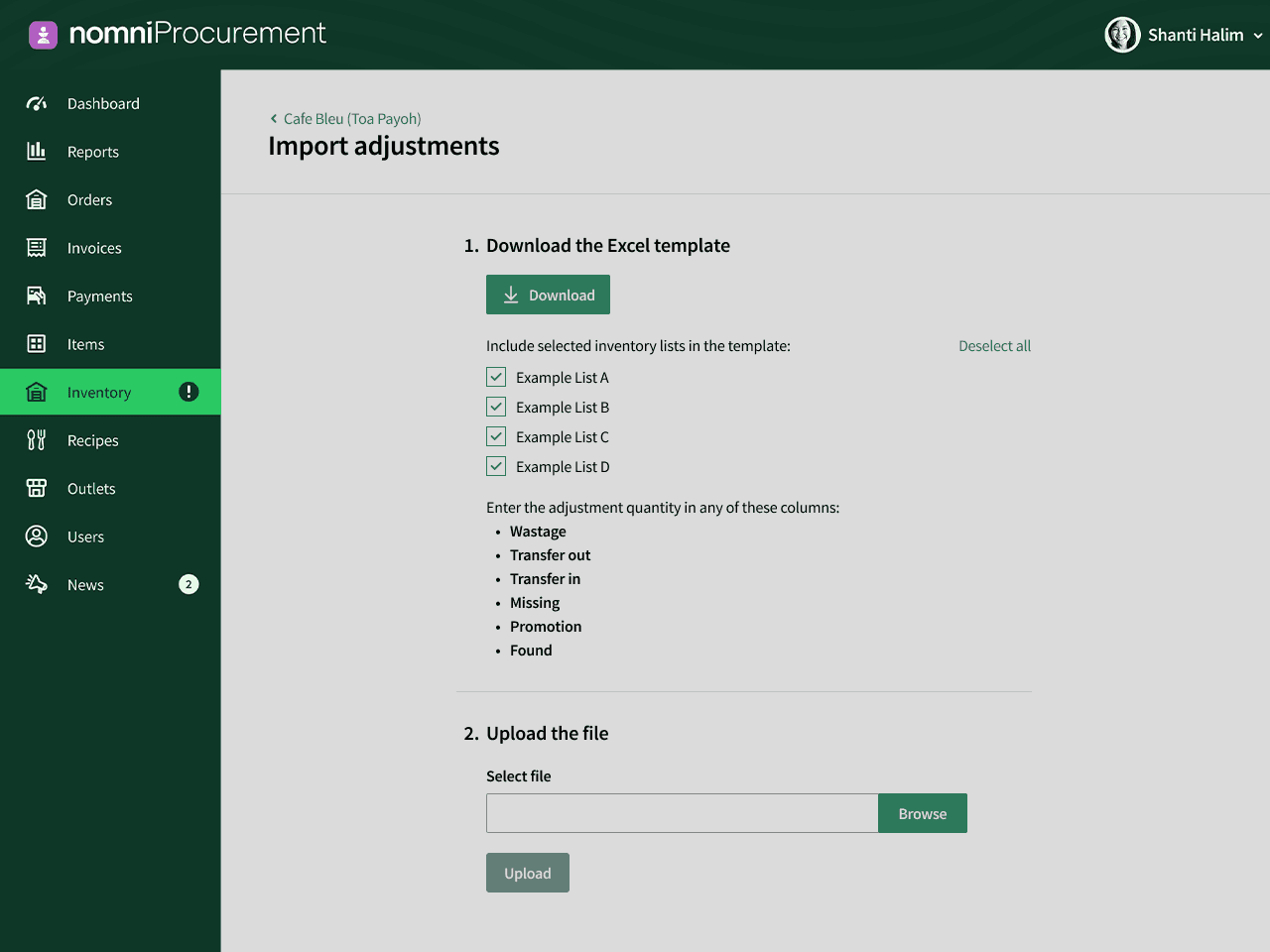
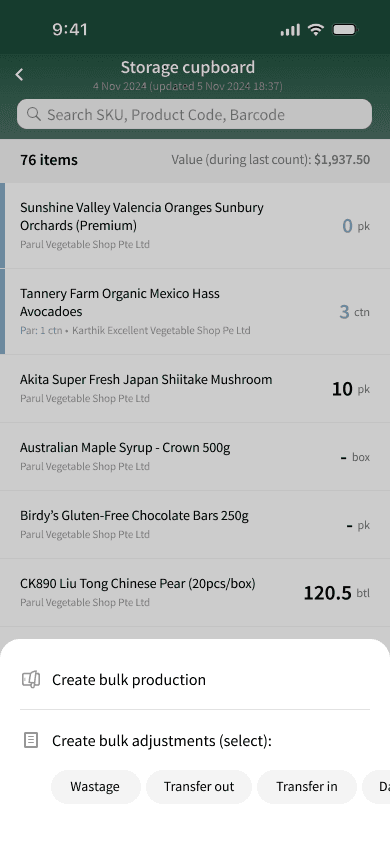
The new ‘Bulk Record Production’ feature is live on Nomni Supply. Now you can record recipe productions and stock adjustments (wastage, transfers, found stock, promotions, etc.) in bulk from the Buyer Hub via desktop and the mobile app.
Why it helps:
Saves hours: Replace dozens of single entries with one bulk upload
Cuts unit/format errors: Units are locked and rows are validated before import, so bad data (unknown items, wrong units, missing fields) is blocked
Fits in with your existing flows: Batch cooks, end-of-day waste, or inter-store transfers are recorded in minutes, not pieced together later
Clear records: Each upload is time-stamped with who did it and what changed
Multiple profiles for same supplier
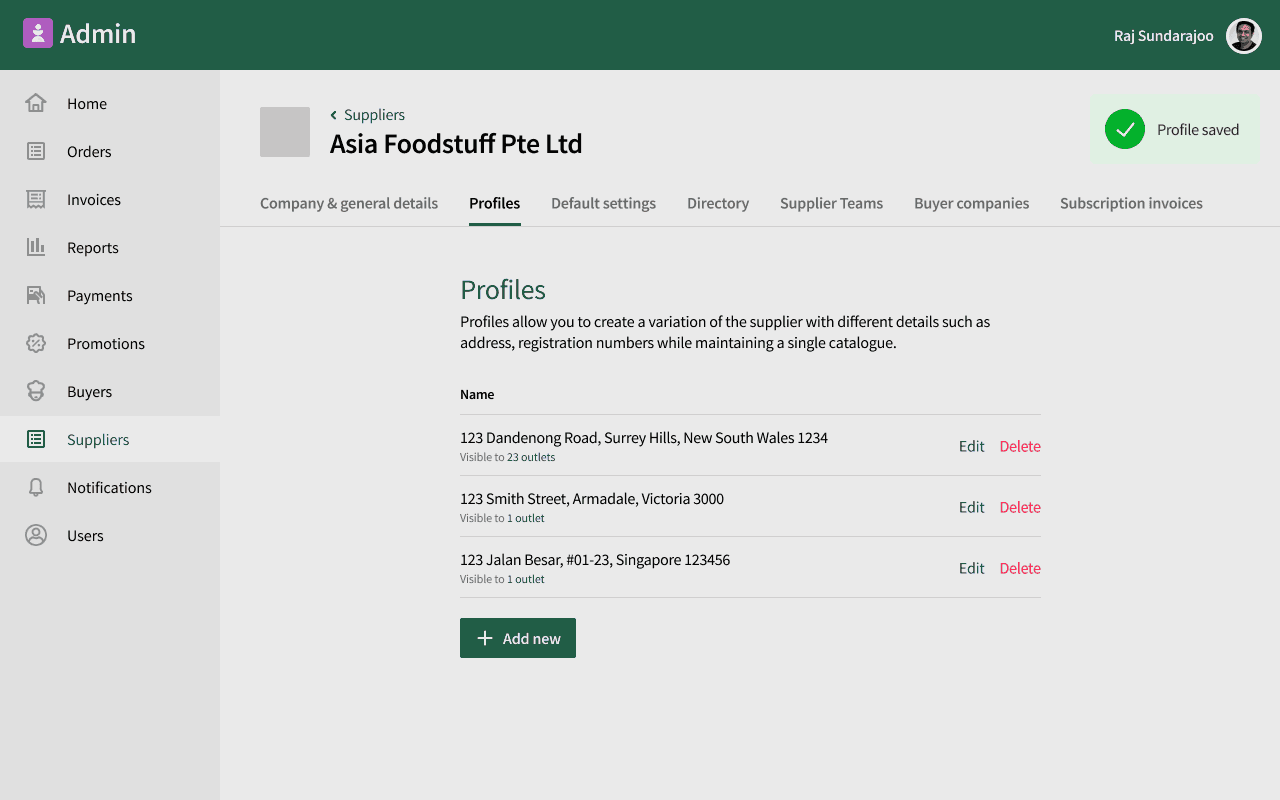
With the launch of the Master supplier feature, Nomni Supply allows you to set up one supplier with multiple branch profiles (different addresses and tax numbers per state), without duplicating the supplier.
Why it helps:
One supplier, many branches, no duplication: Keep a single supplier record and add state branches to it. Lesser admin, fewer records to maintain and audit.
POs go to the right branch, every time: The system auto-selects the local branch for that outlet’s state. This reduces misrouted orders and delivery delays..
Cleaner invoicing: Supplier Hub invoices pull the branch’s address and tax ID, improving invoice matching and reducing reconciliation efforts
There you have it, Nomni Supply’s latest features to make multi-venue management easier!
If you’re new to Nomni Supply, book a demo to see HQ control and bulk updates on a real multi-venue setup. Already on Nomni Supply? Reach out to your account manager or connect with our support team to turn these features on.
Multi-venue operators told us two things: “give HQ the wheel” and “let us update stock in one shot.” Done. Nomni Supply now gives head offices true central control across outlets, plus Excel imports for instant, venue-wide inventory adjustments and productions.
Read on for more detailed information.
The new HQ module
Nomni Supply now allows you to set any of your outlets (other than a central kitchen) as your HQ (headquarters). This HQ owns the master market lists, recipes, and inventory.
Choose one outlet as HQ. The HQ updates the product list, prices, and recipes once and every other outlet follows that data. Outlets can view, but not edit.
Why it helps:
One update, all stores: Add a new item or change a price at HQ and it shows up everywhere, no more copying between outlets
Fewer mistakes: Stores can’t accidentally change prices or recipes, so you don’t get different versions floating around
Stable food costs: The same inputs mean the same dish cost across locations, so margins are easier to compare
Faster rollouts: New menu item? Change it once at HQ and move on
Easier training: Teams across outlets follow one playbook, one version of truth and one process
Bulk updates for production & adjustments
The new ‘Bulk Record Production’ feature is live on Nomni Supply. Now you can record recipe productions and stock adjustments (wastage, transfers, found stock, promotions, etc.) in bulk from the Buyer Hub via desktop and the mobile app.
Why it helps:
Saves hours: Replace dozens of single entries with one bulk upload
Cuts unit/format errors: Units are locked and rows are validated before import, so bad data (unknown items, wrong units, missing fields) is blocked
Fits in with your existing flows: Batch cooks, end-of-day waste, or inter-store transfers are recorded in minutes, not pieced together later
Clear records: Each upload is time-stamped with who did it and what changed
Multiple profiles for same supplier
With the launch of the Master supplier feature, Nomni Supply allows you to set up one supplier with multiple branch profiles (different addresses and tax numbers per state), without duplicating the supplier.
Why it helps:
One supplier, many branches, no duplication: Keep a single supplier record and add state branches to it. Lesser admin, fewer records to maintain and audit.
POs go to the right branch, every time: The system auto-selects the local branch for that outlet’s state. This reduces misrouted orders and delivery delays..
Cleaner invoicing: Supplier Hub invoices pull the branch’s address and tax ID, improving invoice matching and reducing reconciliation efforts
There you have it, Nomni Supply’s latest features to make multi-venue management easier!
If you’re new to Nomni Supply, book a demo to see HQ control and bulk updates on a real multi-venue setup. Already on Nomni Supply? Reach out to your account manager or connect with our support team to turn these features on.
Nomni is the first complete hospitality system that works for you. Loved by over 35,000 venues across Asia Pacific and used by tens of millions of diners and operators annually. To see how Nomni can work for you, visit Nomni.ai
Nomni is the first complete hospitality system that works for you. Loved by over 35,000 venues across Asia Pacific and used by tens of millions of diners and operators annually. To see how Nomni can work for you, visit Nomni.ai
Share this post
Share this post
You might also like
You might also like
You might also like


Browse by category
Browse by category

SUBSCRIBE FOR FREE
Get proven ideas to boost covers, spend and repeat visits.
SUBSCRIBE FOR FREE
Get proven ideas to boost covers, spend and repeat visits.
SUBSCRIBE FOR FREE
Get proven ideas to boost covers, spend and repeat visits.
SUBSCRIBE FOR FREE
Get proven ideas to boost covers, spend and repeat visits.
MAGIC APPS
VENUES
RESOURCES
MAGIC APPS
VENUES
RESOURCES
MAGIC APPS
VENUES
RESOURCES
Welcome to Nomni, a new day for hospitality, take back control. Learn more here.

Welcome to Nomni, a new day for hospitality, take back control. Learn more here.
Welcome to Nomni, a new day for hospitality, take back control. Learn more here.
Welcome to Nomni, a new day for hospitality, take back control. Learn more here.