Written by

Nomni
The ultimate hospo solution
Donations Live at the Register Now. Here's How to Switch Yours On.
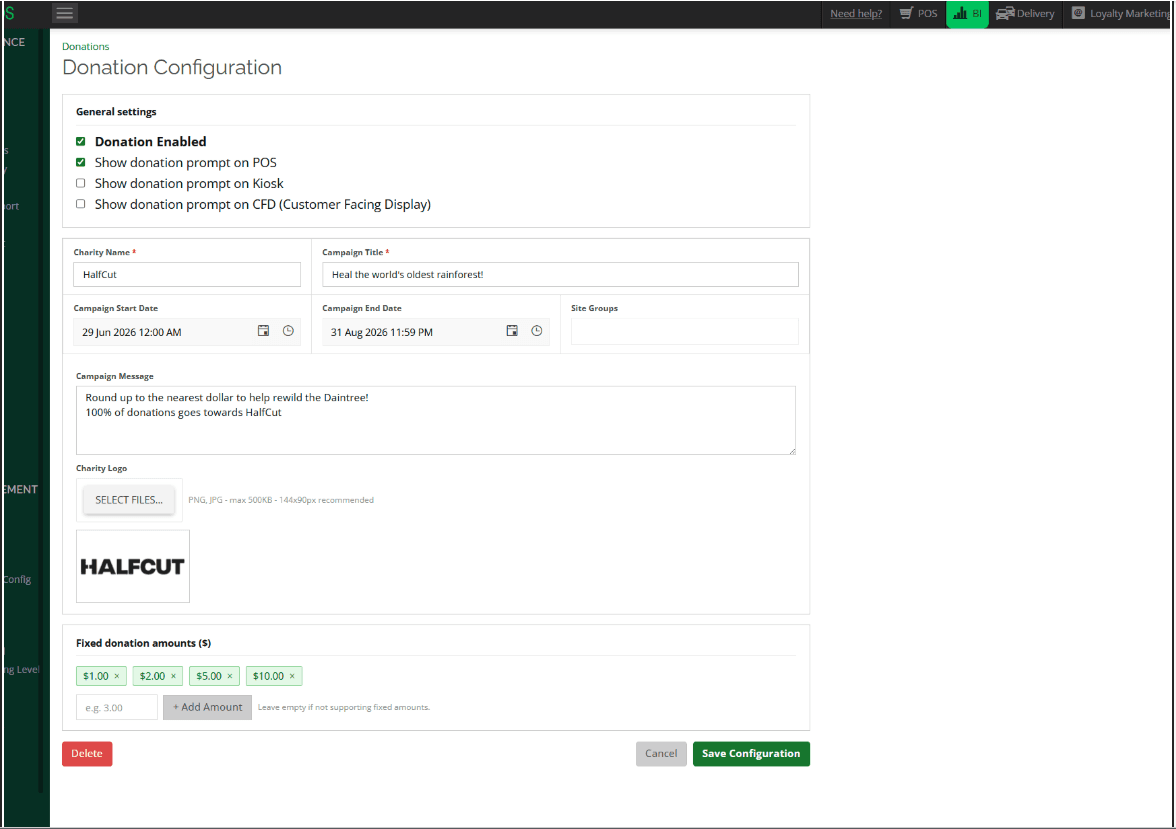
One setup screen controls the donation prompt across iOS POS, iOS CFD and Windows kiosk. Configure it once at HQ level, and it's live wherever the transaction actually happens, no repeat setup device by device.
Choose the charity, write the campaign message, set the amounts, and decide which of the three screens carry the prompt. Customers round up, pick a preset, or skip. Nothing about it is compulsory, and nothing about it needs setting up twice.
New to checkout giving altogether? The Donation Tin Is Gone makes the case for why point-of-sale donations became the channel that actually scales, and how to run the ask without costing you a regular. This one's about getting your first campaign live.
Three decisions to make before you open the config screen
Get these settled first and the setup itself takes minutes.
Decision | Why it matters | Where it's set |
Which channels show the prompt | POS puts the ask in staff's hands, CFD and Kiosk let the customer self-select | Ticked per campaign, on the same setup screen |
One campaign or several running at once | A single site can only have one active campaign at a time | A Site Group per venue, only needed if venues need different campaigns simultaneously |
Round-up, fixed presets, or both | Round-up suits impulse giving, presets suit customers who want to give more | Preset amounts field, leave empty for round-up only |
Setting up your first campaign
Head to Merchant Portal > BI > Configuration > Donations. This is set at HQ level, meaning it's a business-wide setting you configure once, not something you repeat per venue or per device.
Create a new campaign, or open an existing one. Select + New Donation, or the edit icon next to a campaign that's already there.
Tick the channels you want the prompt to appear on. iOS POS, iOS CFD, Windows kiosk, in any combination.
Fill in the campaign details. Charity name, campaign title, start and end dates, and the message customers see on screen.
Assign a Site Group if more than one venue needs a different campaign running at the same time. A single site can only have one active campaign at once, so simultaneous campaigns need to sit in separate Site Groups.
Upload the charity's logo and add any fixed donation amounts. Leave the amounts field empty if you only want to support round-up.
Save, then check the prompt on every channel you switched on before customers see it.
💡 Multi-venue note: running two different charity partnerships across two venues at once only works if each sits in its own Site Group. Without that, only one campaign can be active per site.
Once live, every donation is added to the order total, itemised separately on the invoice, and logged in its own report at Merchant Portal > BI > Sales > Donations, with an export option for handover to the charity.
Before you flip a campaign live
Check |
Channels confirmed (POS / CFD / Kiosk) |
Charity name, logo and message ready |
Campaign start and end dates set |
Site Group assigned, if running more than one campaign |
Preset amounts added (or left blank for round-up only) |
Flow tested on every enabled channel |
Donation Report checked at BI > Sales > Donations |
The bigger picture
The setup is small on purpose. One screen, one source of truth, every channel in sync, because the moment a donation prompt needs different handling on the till versus the kiosk versus the customer screen, staff stop trusting it and customers stop noticing it. Configure once, and the consistency does the work.
Ready to run a donation campaign across your venues? Book a call.
Already on Nomni One? Get started yourself: head to Merchant Portal > BI > Configuration > Donations.
FAQs
Can I run separate donation campaigns at different venues simultaneously?
Yes, using Site Groups. A single site can only have one active campaign at a time, so separate campaigns running simultaneously need separate Site Groups.
Do I have to enable the prompt on every channel?
No. Channels are selected per campaign, so you might choose CFD and Kiosk only, or add POS later. Any combination is supported from the same setup screen.
Can I offer round-up only, without fixed preset amounts?
Yes. Leave the preset amounts field empty, and the prompt will only offer round-up.
Will the donation show up separately from the order total on the receipt?
Yes. The donation is added to the order total but appears as its own line on the invoice, separate from the sale.
Where do I find donation totals for reconciliation?
Merchant Portal > BI > Sales > Donations. The report shows invoice date and time, invoice number, company, invoice amount and donation amount, filterable by date or company, with an export option.