
Loyalty
Loyalty
Loyalty on Your Terms: Set Rewards by Store, Group or Brand
Loyalty on Your Terms: Set Rewards by Store, Group or Brand
Loyalty on Your Terms: Set Rewards by Store, Group or Brand
Set your venue's loyalty reward rate per store, group or whole brand in Nomni Merchant Portal, and choose which site funds each reward. Step-by-step guide.
Set your venue's loyalty reward rate per store, group or whole brand in Nomni Merchant Portal, and choose which site funds each reward. Step-by-step guide.
Written by

Nomni
The ultimate hospo solution
Your loyalty currency can drive return visits, and its cost is yours to control. Nomni Rewards lets you match the percentage you give back to each site's own margins and goals.
A flagship city venue, a suburban store and a franchised site each have their own economics and their own reasons to reward. Nomni Rewards lets you set the reward rate per store, per group of stores, or across the whole brand, and decide which site carries the cost when a reward is earned at one place and redeemed at another.
Here is how to configure it in Nomni Merchant Portal.
Think in two dimensions before you touch a setting
Before you set anything, decide two things: where the rate applies, and who pays for it. Those two choices do most of the work.
Scope you set it at | Use it when |
Whole brand | You want one consistent rate everywhere and simple reporting |
Branch group | A cluster of sites shares economics (all airport stores, all franchised sites) |
Single store (branch) | One site needs its own rate to fix quiet periods or protect a tighter margin |
Then choose who funds the reward. This matters the moment a customer earns at one site and redeems at another:
Regular: the site where the reward is redeemed carries the cost. Simplest for single owners.
Backed: the site that issued the reward carries the cost, held until it is redeemed elsewhere. Built for franchised groups where one operator should not wear the cost of a reward earned at another.
Payout: Nomni covers the cost. Reserved for specific commercial arrangements, not everyday use.
💡 Multi-venue note: if you run a franchise or a mix of owned and licensed sites, Backed is usually the fair default. It stops a busy flagship from subsidising rewards redeemed across the network.
Configuring it, step by step
Set the scope first. In Nomni Merchant Portal, start a new reward currency listing and choose whether it applies at merchant, branch group, or branch level. This single choice is what lets you run different rates per site.
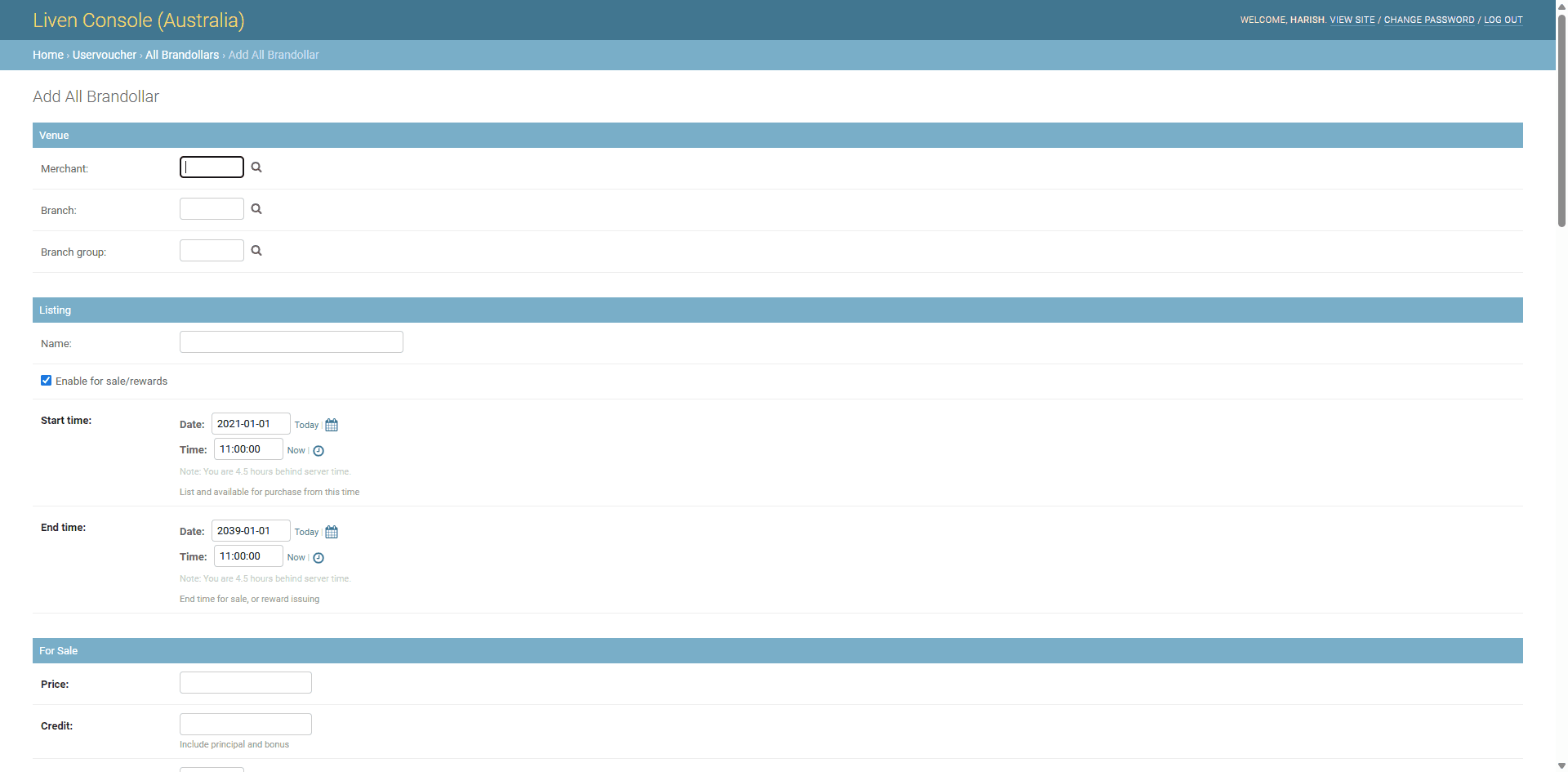
Name the reward. This name is what diners see in their wallet in your Magic App and when they earn through Nomni Connect, so keep it branded, for example "Kenzen Rewards".
Set the rate. Enter 0 in the Price and Credit fields, tick Is rewards, then enter the percentage you want to give back and save. Only one reward tier is allowed per merchant, branch group or branch, so the rate you set here is the rate for that scope.
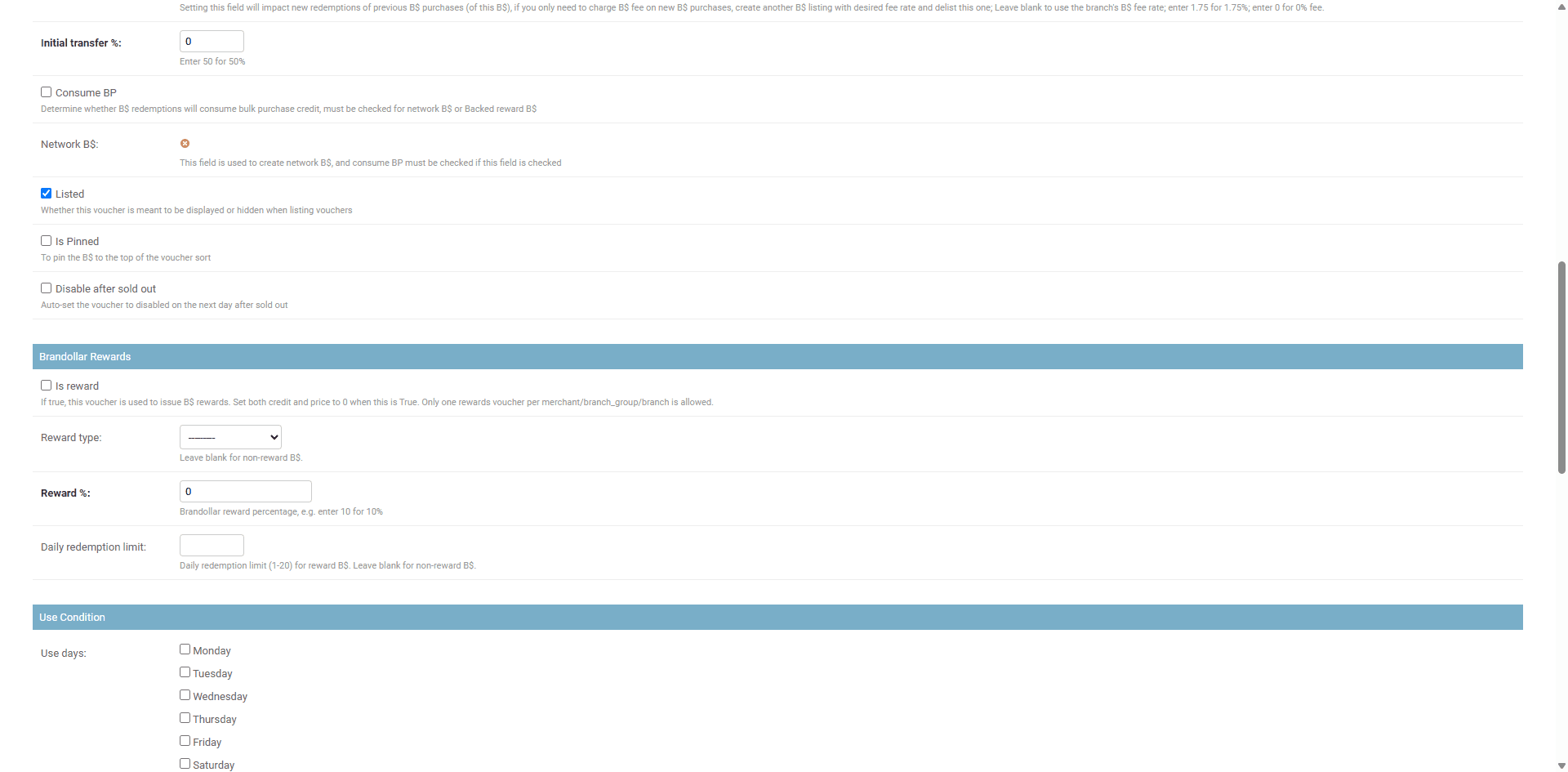
💡 Watch for this: the reward percentage cannot be changed once a transaction has been processed against it. To move the rate, deactivate the tier and create a new one at the new percentage. Set it deliberately the first time.
Choose who funds it. Set the reward type to Regular, Backed or Payout per the funding logic above. For a single-owner venue, this is straightforward. For a group, it is the difference between a fair statement and a frustrated franchisee.
Set your redemption rules. On the same listing, you can control how the currency behaves once earned: cap how much can be issued, set an availability window with start and expiry dates, and apply a fee rate where relevant. Because your currency is closed-loop, it stays spendable only within your brand, which keeps the value and the data with you.
Write what the diner sees. Fill in the reward offer description so the earn is clear on the app: a reward title ("Earn 5% in Kenzen Rewards"), a short description, and the fine print noting that rewards are not earned on the portion of a bill already paid with rewards or currency.
Going further: vary by more than location
Location is the starting point, not the ceiling. Nomni Loyalty is a programmable engine, so beyond site-by-site rates you can shape rewards by time of day or day of week (lift a slow Monday), by spend threshold (reward baskets over a set amount), and by customer segment (new versus returning, or a VIP tier).
Run this check per site
Decision | Where you set it |
Which sites get this rate | Scope: merchant, branch group or branch |
The percentage back | Reward %, on the reward listing |
Who absorbs the cost | Reward type: Regular, Backed or Payout |
How long it runs | Start and expiry dates on the listing |
What the diner reads | Reward offer description and fine print |
The bigger picture
Your reward rate is both a growth lever and a cost, and you decide both. Matching it to each site's margins and goals turns loyalty into a margin tool that works as hard as your pricing does, at whatever level of granularity suits your group, whether that is one rate across the brand or a different rate in every store.
Ready to make loyalty work harder?
If you want to map reward rates to your venues and objectives, book a chat with our team.
Related reading: Set different prices for different venues, locations or channels and Loyalty tiers for restaurants.
FAQs: Setting loyalty reward rates per site
Can I set a different loyalty reward rate for each store?
Yes. With Nomni Rewards, you set the reward rate at one of three levels: your whole brand (merchant), a group of sites (branch group), or a single store (branch). One reward tier applies per level, so each store or group can run its own rate, or you can keep one rate everywhere if that suits you.
How do I set a reward rate?
In Nomni Merchant Portal, create a new reward currency listing, set the Price and Credit fields to 0, tick "Is rewards", enter the percentage you want to give back, and save.
Can I change a reward rate once it is live?
Not on the same tier once a transaction has been processed against it. To move the rate, deactivate the current tier and create a new one at the new percentage, so it is worth setting the rate deliberately the first time.
If a customer earns a reward at one site and redeems it at another, who covers the cost?
You choose. Regular means the site where the reward is redeemed carries the cost. Backed means the site that issued it carries the cost, which suits franchised groups. Payout means Nomni covers it, for specific arrangements.
Where can customers spend their rewards?
Your reward currency is closed-loop, so it is spendable only within your brand. That keeps the value, and the customer data with you.
Do customers need to download an app or sign up to earn?
No. Customers earn by paying, whether by card, wallet, QR or kiosk, and can activate rewards through Nomni Connect with no download required.
Can I vary rewards by time or customer type, not just by location?
Yes. Nomni Loyalty is programmable, so alongside per-site rates you can shape rewards by time of day or day of week, by spend threshold, and by customer segment.
Your loyalty currency can drive return visits, and its cost is yours to control. Nomni Rewards lets you match the percentage you give back to each site's own margins and goals.
A flagship city venue, a suburban store and a franchised site each have their own economics and their own reasons to reward. Nomni Rewards lets you set the reward rate per store, per group of stores, or across the whole brand, and decide which site carries the cost when a reward is earned at one place and redeemed at another.
Here is how to configure it in Nomni Merchant Portal.
Think in two dimensions before you touch a setting
Before you set anything, decide two things: where the rate applies, and who pays for it. Those two choices do most of the work.
Scope you set it at | Use it when |
Whole brand | You want one consistent rate everywhere and simple reporting |
Branch group | A cluster of sites shares economics (all airport stores, all franchised sites) |
Single store (branch) | One site needs its own rate to fix quiet periods or protect a tighter margin |
Then choose who funds the reward. This matters the moment a customer earns at one site and redeems at another:
Regular: the site where the reward is redeemed carries the cost. Simplest for single owners.
Backed: the site that issued the reward carries the cost, held until it is redeemed elsewhere. Built for franchised groups where one operator should not wear the cost of a reward earned at another.
Payout: Nomni covers the cost. Reserved for specific commercial arrangements, not everyday use.
💡 Multi-venue note: if you run a franchise or a mix of owned and licensed sites, Backed is usually the fair default. It stops a busy flagship from subsidising rewards redeemed across the network.
Configuring it, step by step
Set the scope first. In Nomni Merchant Portal, start a new reward currency listing and choose whether it applies at merchant, branch group, or branch level. This single choice is what lets you run different rates per site.
Name the reward. This name is what diners see in their wallet in your Magic App and when they earn through Nomni Connect, so keep it branded, for example "Kenzen Rewards".
Set the rate. Enter 0 in the Price and Credit fields, tick Is rewards, then enter the percentage you want to give back and save. Only one reward tier is allowed per merchant, branch group or branch, so the rate you set here is the rate for that scope.
💡 Watch for this: the reward percentage cannot be changed once a transaction has been processed against it. To move the rate, deactivate the tier and create a new one at the new percentage. Set it deliberately the first time.
Choose who funds it. Set the reward type to Regular, Backed or Payout per the funding logic above. For a single-owner venue, this is straightforward. For a group, it is the difference between a fair statement and a frustrated franchisee.
Set your redemption rules. On the same listing, you can control how the currency behaves once earned: cap how much can be issued, set an availability window with start and expiry dates, and apply a fee rate where relevant. Because your currency is closed-loop, it stays spendable only within your brand, which keeps the value and the data with you.
Write what the diner sees. Fill in the reward offer description so the earn is clear on the app: a reward title ("Earn 5% in Kenzen Rewards"), a short description, and the fine print noting that rewards are not earned on the portion of a bill already paid with rewards or currency.
Going further: vary by more than location
Location is the starting point, not the ceiling. Nomni Loyalty is a programmable engine, so beyond site-by-site rates you can shape rewards by time of day or day of week (lift a slow Monday), by spend threshold (reward baskets over a set amount), and by customer segment (new versus returning, or a VIP tier).
Run this check per site
Decision | Where you set it |
Which sites get this rate | Scope: merchant, branch group or branch |
The percentage back | Reward %, on the reward listing |
Who absorbs the cost | Reward type: Regular, Backed or Payout |
How long it runs | Start and expiry dates on the listing |
What the diner reads | Reward offer description and fine print |
The bigger picture
Your reward rate is both a growth lever and a cost, and you decide both. Matching it to each site's margins and goals turns loyalty into a margin tool that works as hard as your pricing does, at whatever level of granularity suits your group, whether that is one rate across the brand or a different rate in every store.
Ready to make loyalty work harder?
If you want to map reward rates to your venues and objectives, book a chat with our team.
Related reading: Set different prices for different venues, locations or channels and Loyalty tiers for restaurants.
FAQs: Setting loyalty reward rates per site
Can I set a different loyalty reward rate for each store?
Yes. With Nomni Rewards, you set the reward rate at one of three levels: your whole brand (merchant), a group of sites (branch group), or a single store (branch). One reward tier applies per level, so each store or group can run its own rate, or you can keep one rate everywhere if that suits you.
How do I set a reward rate?
In Nomni Merchant Portal, create a new reward currency listing, set the Price and Credit fields to 0, tick "Is rewards", enter the percentage you want to give back, and save.
Can I change a reward rate once it is live?
Not on the same tier once a transaction has been processed against it. To move the rate, deactivate the current tier and create a new one at the new percentage, so it is worth setting the rate deliberately the first time.
If a customer earns a reward at one site and redeems it at another, who covers the cost?
You choose. Regular means the site where the reward is redeemed carries the cost. Backed means the site that issued it carries the cost, which suits franchised groups. Payout means Nomni covers it, for specific arrangements.
Where can customers spend their rewards?
Your reward currency is closed-loop, so it is spendable only within your brand. That keeps the value, and the customer data with you.
Do customers need to download an app or sign up to earn?
No. Customers earn by paying, whether by card, wallet, QR or kiosk, and can activate rewards through Nomni Connect with no download required.
Can I vary rewards by time or customer type, not just by location?
Yes. Nomni Loyalty is programmable, so alongside per-site rates you can shape rewards by time of day or day of week, by spend threshold, and by customer segment.
Nomni is the first complete hospitality system that works for you. Loved by over 35,000 venues across Asia Pacific and used by tens of millions of diners and operators annually. To see how Nomni can work for you, visit Nomni.ai
Nomni is the first complete hospitality system that works for you. Loved by over 35,000 venues across Asia Pacific and used by tens of millions of diners and operators annually. To see how Nomni can work for you, visit Nomni.ai
Share this post
Share this post
You might also like
You might also like
You might also like


Browse by category
Browse by category

SUBSCRIBE FOR FREE
Get proven ideas to boost covers, spend and repeat visits.
SUBSCRIBE FOR FREE
Get proven ideas to boost covers, spend and repeat visits.
SUBSCRIBE FOR FREE
Get proven ideas to boost covers, spend and repeat visits.
SUBSCRIBE FOR FREE
Get proven ideas to boost covers, spend and repeat visits.
MAGIC APPS
VENUES
RESOURCES
MAGIC APPS
VENUES
RESOURCES
MAGIC APPS
VENUES
RESOURCES
Welcome to Nomni, a new day for hospitality, take back control. Learn more here.

Welcome to Nomni, a new day for hospitality, take back control. Learn more here.
Welcome to Nomni, a new day for hospitality, take back control. Learn more here.
Welcome to Nomni, a new day for hospitality, take back control. Learn more here.